Showing posts with label android. Show all posts

6.15.2012

Safe Sexting... [Apps]

Recently I've come across a couple articles about mobile apps coming out to help make sexting safer.  I'm guessing because camera phones are almost unavoidable at this point and many have front camera.  People like to get a little creative with what they send to someone they are interested in or dating.  The downfall to having this bit of extra fun to keep your mate entertained when you aren't near is what could happen if y'all go your separate ways or if they aren't into you like you are into them?  Do they just delete the picture or do they decide to put you on blast for their amusement and your embarrassment?  Most of us aren't famous enough for TMZ to end up with the pictures but with social networking and pictures sharing at an all time high, its not hard to believe that there have been a few ex's to broadcast pictures during Twitter trending topics on Tuesdays and Thursdays or other media sharing stages such as Instagram, Tumblr, Facebook, etc. 

Well that's the problem and now they are in the first stages of the solution.  I say first stages because both apps I'll list below have potential but both need some work.  What will probably end up happening in the future, iOS and/or Android will add an optional expiration to their text messaging applications. #MarkMyWord

The first application I heard about is called Snap Chat for iOS (only) available in the AppStore.  This application requires that both parties have the application but it allows you to set a time limit for the picture to be available after the other person opens it.  It doesn't prevent the other user from taking a screenshot but will send you a notification to let you know that they took one.  The application uses its own messaging services so your messages will not take away from your monthly text messages.


The second app (Fancy Snap) has its benefits and downfalls compared to the first one, this one doesn't require that both individuals have the application so even though the app is Android only, the type of phone the recipient has doesn't matter. The messages will use your monthly allotment for text messaging for those without unlimited SMS/MMS.  Fancy Snap is available on Android OS and has a free and paid version in the Android Market Google Play Store. Much like the application above you set a timer for the picture to expire, but it adds read receipts, and some graphics to help you do some censoring.  Here's a few screen shots of this app.


Which ever you choose or don't choose be safe and always know that whatever recklessness you participate in today can come back to haunt you in the future.

3.29.2012

"Android Vs iOS The Truth about Apple and Google's OS"

One of my friends originally shared this G+ post with me.  After watching the video and agreeing with pretty much all the points that were made by a person that used both products, I must say I agree.  At the end of the day every phone or device isn't for everyone, but power users will understand where one device lacks in comparison to the other.  In the long run it's your decision as to which one fits you best...for me its hard not to choose Android OS over iOS for my phone. I like Apple products and the quality craftsmanship that they put into their devices, but the Android OS just works better for me when it comes to the amount of things I use my phone for.

Check out the G+ post or video below and feel free to leave your opinions on this blog.


2.22.2012

NBA All-Star Live Wallpaper [Android]

Here's a fun app/wallpaper for all the NBA fans out there. Its free with upgradable features that cost a fee. Enjoy.
Android App Review: NBA All-Star Live Wallpaper:
NBA live wallpaper 1

If you're a fan of the NBA and live wallpapers, you'll want to check out the NBA All-Star Live Wallpaper app, which enables you to customize your background with your favorite NBA team.

The app is what we call freemium, which means that it is free to download the initial app, but you'll have to pay up for each team you decide to download from then on. Each team's live wallpaper is $1.99 with an in-app purchase, or you could buy every team for a flat fee of $4.99. You can also purchase team ringtones, but they come with the $4.99 package.

Once the app is installed, you'll need to go to the wallpapers gallery to find the NBA options. Once you click on it, you'll be able to customize:


  • Team (only those you've paid for)

  • Court (Home Court, Team Clubhouse, or Blacktop)

  • Ball Type (NBA Official Ball, Team Ball Black, Team Ball Two-Tone, Red White and Blue, All-Star)

  • Number of Basketballs (1 - 5)

  • Ringtone (you'll also be able to access team ringtones if you purchase those)

Once the wallpaper is set, you'll see the basketballs that you've chosen bouncing around. Tapping one of them will make it bounce and tilting your phone will move them, all the while seeing your favorite team's logo in the middle of the screen. The wallpapers are all nicely designed and they're perfect for NBA fans who want to show off their fandom all of the time.

As I mentioned above, the initial download is free from the Android Market. We've got links after the break as well as more screenshots.

read more


8.12.2011

How To Get Your Facebook App to Deliver Notifications Correctly [Android]


I'm sure plenty of Android users that just don't like the Facebook app and probably use the website more for their various reasons.  I'm not promoting the app or trying to convert anyone, but one of my main reasons that I've been using Tweetdeck for twitter and facebook is that it delivers notifications to my phone that I won't get from the Facebook app unless I'm actually in the application looking at the main screen.  Yesterday I read a post about a weird fix that someone came up with, so I decided to try it. 

The fix is simply to log into the facebook application on an active blackberry (or active your old one temporarily) turn on notifications in the blackberry app and go through the motions of setting it up as if you were going to use it daily.  When you are done log out of the app and banish the blackberry to the dungeon it deserves to reside in (j/k). Next thing you know when you get notifications your Android will get them and actually buzz and add an icon in your notifications tray.  Just make sure you go into the settings in the FB app and turn the notifactions on.

This was figured out by a person who has a daughter that just got an Android phone after having a Blackberry phone and their notifications were coming through flawlessly, where as the parent (much like myself) wasn't getting any notifications.  I actually should have been, but I remember clearly going into my Facebook settings from the web and disabling the blackberry notifications because I no longer had a blackberry.  My fiancee on the other hand told me she always gets the notifications, so this confirmed what I had read in the article.  I tested it out this morning and its been non stop notifications popping up on my Evo.  A simple and quick fix, now go find one of those

Here's the original posting describing the fix: "FaceBook Push On Android Not Working For You? BlackBerry Could Remedy That [Changing Simple FaceBook Settings On A BlackBerry Fixes Buggy Push Notifications]"

"- Find someone with a working BlackBerry. This could be a friend or any store that has activated demo phones.

- Using the Facebook app on the BB log into your account and wait for your stuff to start appearing. I did not log into email or anything else, just FB.
- After you see your Newsfeed updated with your information simply log out.
- Go into your FB settings on your Android phone and check the Notifications box. The refresh interval doesn’t matter (it can even be set to Never).
- Notifications should start appearing as you get them (Comments, Wall Posts, Pokes, Likes, Messages, etc.)"


8.05.2011

How Much Do You Love/Need Your Phone? [SURVEY]


The above is a survery conducted by telenav to show how much American's love their cellphones and what they would rather give up for a week opposed to giving up their phone for that same amount of time.

Honestly, I would just give up the phone, its just like going on a cruise.  As long as I have a laptop or tablet device, I'll be sstraight.  What about you?


For more on this survey check out the this article, "One-third of Americans would give up sex before their cell phones [infographic]"

6.15.2011

A DJ at Your Desk!!! For Free, FTW

DJ DUBLEE Your Personal DJ On The Go!


I gotta give a huge shout out to a fellow UMBC Alumni and the man that puts the mixes together that helps to get me though the day. Sure some of you go to Panadora and other streaming sites that play commercials and make mixes that you don't really understand, but DJ Dublee puts up mixes that are blended and scratched on just like you would hear at a club or happy hour to take your away from your cubical for a moment.

His mixes are high quality and free to stream or download to listen to later.  The music ranges from the Classic Soul, R&B, Neo Soul, Rap/Hip-Hop, Go-Go, Independent, Mainstream, practically anything you could possibly be looking for.  You can submit request and he'll throw the song(s) into a mix, you can search the history of his mixes to find a particular artist.

Below is a quick preview of his mixes over the past month, but I suggest you check out the site for yourself to browse some of the older mixes as well.  I guarantee you will find a mix that perfectly fits your mood for the day on any given occassion.  Right now I'm rockin to his Go-Go mix from May 4th.

Oh yeah did I mention its 100% free, the mixes can be downloaded and listened to whenever, and will work on Android/iPhone/iPad/Blackberry devices, what more can you ask for.  DJ Dublee is your personal & portable DJ! Enjoy People.

(Also you will notice that DJ Dublee clearly labels his mixes to let you know ahead of time whether there is any foul language in the mix)  
qtip1 copy The Love Unlimited Orchestra – I Wanna Stay Q-Tip – Vibrant Thing Beenie Man ft. Janet Jackson – Feel It Boy Ol’ Dirty Bastard ft. Kelis – Got Your Money Busta Rhymes – Do The Bus A Bus Babyface – There She Goes Kool & The Gang – Too Hot Coolio – Too Hot    A [...]

PM+Dawn+012762_11 copy    Soul II Soul – Keep On Moving Ralph Tresvant – Sensitivity Sybil – Don’t Make Me Over Janet Jackson – That’s The Way Love Goes PM Dawn – Set Adrift on Memory Bliss Suzanne Vega – Tom’s Diner Nikki D – Daddy’s Lil Girl Dwele – Find A Way Seal – Fly Like An [...]

ruff-ryders-artists-with-names copy Jay-Z & DMX – Money, Cash, H*** Snoop Dogg ft. C-Murder – Down For My Eve – What Yall Want Lil Kim – No Time For Fake Ones Swizz Beatz ft. Cassidy, JadaKiss, Snoop Dogg – Bigger Business Young Buck – Let Me In Cassidy ft. Mary J. Blige – I’m A Hustla Noreaga & [...]

Tre-Dot copy June Da Kid ft. Born Undadogz – Back Then K. Sparks – Hip Hop June Da Kid – My Choice Tonight Laelo Hood ft. Pro-Verb, Lyriciss – Cool Tree Gotti – Butter Ball Naked Tre-Dot ft. Kimia Colins – Keep On Hatin Bobby Creekwater – OJ Simpson Dugee F. Buller – I Burst Lega-C – [...]

TI copy T.I. – 24’s Juvenile & UTP – Nolia Clap T-Pain ft. Yung Joc – Snappin’ Bun B ft. Trey Songz, Mike Jones – Hold You Down Snoop Dogg ft. R. Kelly – That’s That Cam’ron – Touch It Or Not Styles P – Good Times Ice Cube – Today Was A Good Day Lil Boosie [...]

Shaquille O'Neal Portrait After an outstanding carreer, Shaquille O’neal retires after 19 seasons as being one of the most dominating players to ever play the game. Shaq accumulate four championship rings through out his career and also recorded four albums. Here is a mix I put together with some of my favorite Shaq songs sprinkled in! Shaquille O’neal [...]
rick_ross_575 copy Meek Mill ft. Rick Ross – Tupac Back YC – Racks Drake ft. Rick Ross, Lil Wayne, DJ Khaled – I’m On One Dirty Money ft. Trey Songz, Diddy – Your Love Lil Wayne ft. Rick Ross – John Rihanna – Man Down Jerimiah ft. 50 Cent – Down On Me Trey Songz ft. Drake [...]

WillSmith_Summertime copy Kool and The Gang – Summer Madness Will Smith – Summertime Beyonce ft. Ghostface Killah – Summertime Travis Porter – Bring It Back David Banner – Play Ray J ft. Lil Kim – Wait A Minute Gyptian ft. Nicki Minaj – Hold Yuh Beenie Man – Drinking Rum Mad Lion – Take It Easy Notorious [...]


4.12.2011

The Best Words is Now The Best of Both Worlds: Wordfeud Has Arrived for iOS

Finally it has arrived! WordFeud on iOS, so all my Android friends can delete Words with Friends and tell your iOS buddies to get the more superior game if they want to play a real mans version of Scabble.  As I said in my previous blogpost, Word(Feud) with Friends???, Words With Friends is cool, but the only benefit was cross-platform play, now there's nothing that makes this game worth having.  I don't know who half the people I'm playing against are on WWF because they don't have a profile picture, and shaking my phone like I'm about to roll dice at the craps table when I need to shuffle my letters while secretly playing words in a meeting just aint cool man...

The WordFeud developers site posted on April 5th that WordFeud had arrived to iOS, but I wonder why AndroidCentral, Boy Genius Report (BGR), or Engadget (the main tech sites that I check) didn't have anything mentioned, or did I miss it?  Someone on AndroidForums even meantioned that they didn't see a post about it.  All of those sites made a big deal about WWF becoming cross platform, but when it comes to WF which is a much better game they are all quiet.

Well Dear iOS Buddies, I am going to finish my 3 current games on WWF then delete it forever, come see me on WordFeud, you know the name, the name don't change!

Here's the post from the WordFeud Dev Site:
http://wordfeud.com/blog/2011/04/05/wordfeud-for-ios-is-here/

Wordfeud for iOS is here

by wordfeud on April 5th, 2011

After about four months of development, Wordfeud for iOS is finally out. A big thanks to everyone who helped with final beta testing.

It spent almost exactly one week waiting to be reviewed by the Apple people (which seems to be the norm these days). Thankfully, it was approved on the first attempt.


3.16.2011

Word(Feud) With Friends???

After a month and some change going by of Words With Friends (WWF) being on Android OS, I have concluded that I still like WordFeud (WF) better. WWF is a good game but in comparison to WF is lacking in so many departments. I'll break it down for you.

WWF Good (Compared to WF)
  • Ability to play against iOS and Android friends
  • Ability to play against iOS and Android friends (I listed this twice because it holds the most weight for now...)
  • Beautiful Bright Interface
  • Nice Sound Effects (if you are into that sort of thing, but for me I'm using playing it places I shouldn't be playing games and I prefer silence
  • Tells you if a word is not a word a lot quicker than WF

WWF Downfalls (Compared to WF)
  • Can't save opponents to a friends list so to have easy access to play them again later.
  • Crashes, Force Closes, and Corrupts Games on Android OS. They have come out with several updates since the original launch so I'm sure at some point they will get this right. The quick fix is to uninstall and reinstall the game, which forces you to log back in with your username so that it can redownload your game information (or for the geeks go to Application Settings and clear cache and content).
  • The button to Resign the game is on the main screen, so it can accidentally be hit
  • Its cool that if you shake the phone it Shuffles your letters, but can I just get a button? I don't want to shake my phone a bunch of times while I'm attempting to figure out what words I can make from my letters.
  • The Ads pop up after every word you play and the load a lot slower. So it seems to take longer to exit out of them
  • Its too easy to make super ridiculous point words because the Special Blocks are closer together so like a 4 letter word can get Triple Letter and Triple word, opposed to you needing make a 5 letter word in WF
  • Lack of options (Maybe that’s the former Blackberry User in me, but I like having options)
  • Only 1 board. WF has a standard and random boards to play when you get tired of the same special tile placement
  • The Chat function is a bit slower. But honestly the Chat function in WF is the best in the world, hit me on Twitter or GChat if u want to talk trash for real...lol
  • I feel like there are a few other things that I didn't like about WWF compared to WF but I can't think about them right now. But if anyone else has any complaints leave it in the comments section. LOL
To sum that up WWF just seems be lacking and very buggy.

The WordFeud developers site posted this about a month ago, which pretty much means the slight upper hand that WWF had over WF will be taken away from them.
Wordfeud for iOS sneak peek
by wordfeud on February 9th, 2011
Wordfeud for iOS is coming soon!
Wordfeud on iOS and Android - side by side
 Wordfeud for iOS


Update: WordFeud for iOS is now available check out this blog for more info: http://riprock81.blogspot.com/2011/04/best-words-is-now-best-of-both-worlds.html

3.11.2011

Take Android Screenshots Without Being Rooted (via Android Central)

I tend to take screenshots and post them then people ask me "how did u do that?"

My only answer is "Root Root Root". LOL, but Rooting isn't for everyone so here's an article I found on the Android Central Tips & Tricks site for Screenshots for Non-Rooted users. I will say honestly its easy as pie once you are rooted, but once again being a SUPERUSER isn't for everyone.


Posted on Friday, Apr 2, 2010 by Jerry Hildenbrand
m.androidcentral.com
Hey everyone.  Here's a quick tip that often gets overlooked amidst the madness. Since everyone loves to show off their Android homescreen setup, Let's talk about how to do it if you're not rooted and not running a home replacement. This works for all devices regardless of any home customizations done by the handset maker. Hit the break to follow along.
The first step is setting up the SDK on your computer. We covered that for Windows users in-depth here, so we will touch briefly for you folks running a Mac or Linux.
  • Make sure you download the correct sdk for your platform.
  • Make sure you're up to date with the Java Run Time Envrionment from Sun.
  • Mac users: Update this from the Apple menu, Ubuntu users sudo apt-get install sun-java6-jre.
After you have the SDK all set up, the hard part's over.  Just follow along and you'll be taking screenshots in no time.

1.  Plug your phone into your computer and start up the ddms tool. On a Windows machine, you open your SDK\tools folder and double click the icon (see the picture below). On Linux or a Mac, open your terminal in the sdk/tools and enter ./ddms
Android SDK\tools folder in Windows
The Android sdk\tools folder
2.  Make sure you select your device from the list in the right pane of the ddms application, then select device -> screen capture from the menu bar.  See the picture below.
The ddms utility window
3.  Grab your phone, set up the image you want to grab, and hit the refresh button (see the image below).  When you're satisfied with the results, click save and tell the ddms app where to save it.
The screen capture interface
And that's it!  All that's left is to hit the forums and share your screenshots with the world.

8.11.2010

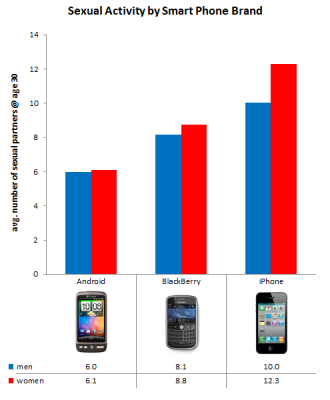
Sexual Activity by Smart Phone Brand


This has to be THEE most random survey and comparison of two things that I probably would have never mentioned in the same sentence.  They used it to come up with an actual statistic.  Some people have too much time on their hands...

BUT! Since I'm looking at the "statistics" lets analyze them and try to come up with an explanation.

  • Women in general appear to be more active than men.
  • iPhone is a "fun" phone.  More fun less business.  Therefore lets assume iPhone owners are the "funnest" of the smart phone owners.  They party more, work less, and tend to be more openly wild.  This appears to be an excessive truth for female iPhone owners. LOL.
  • Blackberry is more of a business or corporate phone.  So lets say their owners are more about business and don't really have as much time for fun as the iPhone owners.  But then again since Blackberry has been multitasking for the longest, we can also assume so has their owners.  Especially due to the fact that the people in corporate power positions are known for having extra marital affairs.  But lets face it, its usually with someone at their job because they spend more time at work than home. So they are a active but not as active as the "fun boys" and "fun girls" that own iPhones.
  • Finally the Android the newest of the smartphones.  The Android has been said to be a mix of Fun and Business.  The Google Android OS is a dream operating system for internet geeks and programmers.  Open Source, create your own apps, the ability to overclock your phone's processor, root you phone and customize the operating system, etc...  With all that said I guess its easy to believe that most of the Android owners are computer geeks and techie people, must I say more?  LOL
Warning: Fellas if you meet a girl that has an iPhone when you meet her, watch her carefully she might be a wild one!  (j/k)

Confusion: I've never owned an iPhone, I've gone from Palm for 1 year to Blackberry for 2 years, my next phone will be an Android, but I do look forward to going back to Blackberry if they make the proper updates and upgrades to their hardware and operating system in the near future.